
The paper attendance register has been part of Indian school culture for as long as most principals can remember. It sits on every class teacher’s desk, it gets signed by the headmaster, it is submitted to the office at the end of term, and it forms the basis of student attendance records for the whole year.
Switching from this to a phone app can feel risky. Teachers are comfortable with paper. What if the app fails? What if teachers do not use it? What if there is no internet in the classroom?
These are fair questions. This post answers them honestly — including what problems paper attendance creates that schools have simply accepted as normal, and what actually changes when a school moves to digital attendance.
No overselling. Just the real picture.
The Problems Paper Attendance Creates That Schools Have Accepted as Normal
The principal has zero visibility until the end of the day
Paper registers sit in classrooms all day. The principal cannot know how many students are present in Class 5B right now. If a class has not been marked yet, the principal only finds out when they physically walk to that classroom or call the teacher. On a normal morning with 20 classes, that is impossible. The school’s daily attendance picture is invisible to school leadership until registers are physically collected.
Teacher time: 20-30 minutes per day, every day
A class of 40 students. The teacher calls names, waits for responses, marks each entry, counts total present, calculates percentage, writes it in the summary column. Then handles late arrivals separately. Multiply this by 220 school days. A teacher spends roughly 70-90 hours per year on attendance alone — hours that could be spent teaching, planning lessons, or giving individual attention.
The substitute teacher problem
When the regular class teacher is absent, the substitute needs to use the register. If it is locked in the absent teacher’s drawer, or if the substitute is unfamiliar with the class, attendance may not be marked at all. Uncollected attendance data for even one day creates gaps in term records.
Term reports take days to compile
At the end of each term, someone in the office manually counts attendance from paper registers — class by class, student by student — to compile attendance percentages for report cards. In a school with 500 students, this is a multi-day job that happens 3-4 times a year.
Parents call the school every day
“Did my son reach school today?” This is one of the most common calls every school receives. Each call takes 2-3 minutes of office staff time. In a school of 500 students, even 10-15 such calls a day adds up to nearly an hour of office time spent on a question that should be answered automatically.
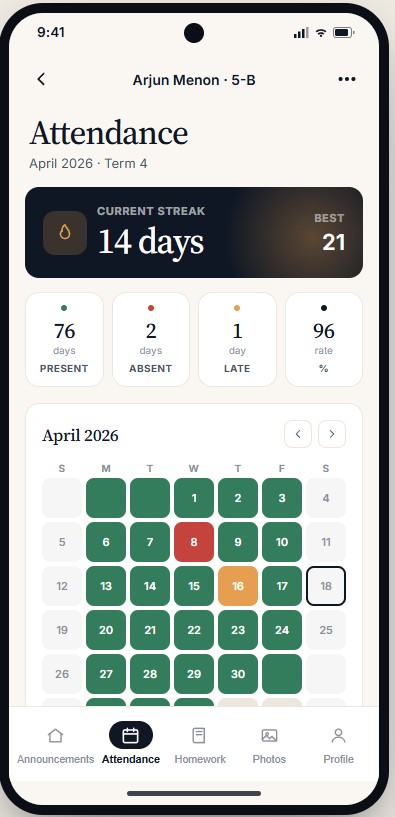
The SchoolSuite teacher app attendance screen — one tap per student, done in under 2 minutes.
What Digital Attendance Actually Looks Like in Practice
The teacher opens the attendance section in their phone app. Their class list is already loaded. They tap each student: green for present, red for absent, or orange for late. There are no names to type, no numbers to count, no percentage to calculate. The app handles that automatically. For a class of 40 students where most are present, the whole process takes under 2 minutes — compared to 20-25 minutes on paper.
The moment the teacher marks the class, two things happen: the admin dashboard updates with the live attendance count for that class, and each marked parent receives a push notification — “Arjun is marked Present — 8:35 AM.” The parent no longer needs to call. The principal no longer needs to check manually.
If a class has not been marked by 9:30 AM, the admin dashboard flags it automatically. The principal can see, in one screen, which classes are marked and which are not — and send a follow-up to specific teachers. This used to require someone walking through corridors or making phone calls.
See the attendance module live — watch a teacher mark a class of 40 students in under 2 minutes, with parent notification and admin dashboard updating in real time.
Book a Demo Call →Addressing the Real Concerns
“What if there is no internet in the classroom?”
This is the most common concern, and it is valid. Any school management software worth using must have offline attendance capability. In SchoolSuite, the teacher can mark attendance without any internet connection. The data is stored locally on the phone and syncs to the server the moment connectivity is restored — even hours later. This makes the system reliable even in schools with inconsistent connectivity.
“What if teachers refuse to use it?”
Teacher resistance is usually based on fear of complexity, not stubbornness. The key question is: can a teacher who knows how to use WhatsApp learn the attendance marking process without a training session? With a well-designed teacher app, the answer should be yes. Most teachers using SchoolSuite are comfortable with attendance marking within 2-3 days of going live, without formal training.
“What about government inspection? Do we still need paper records?”
This depends on your state board and inspection requirements. Some schools choose to maintain a simplified paper register alongside digital attendance during the first year as a backup. The digital system can generate printed attendance reports for any class or date range, which can be produced during inspection if required. The two systems are not mutually exclusive during the transition period.
“What if a teacher marks attendance incorrectly?”
Corrections should be possible. In a properly built system, a teacher can edit attendance for the current day, and the admin has override access for any corrections. Every edit is logged with a timestamp and the user who made the change. This is actually better than paper, where corrections are made by striking through and initialling, with no system-level record of who changed what.
What Three Months After Switching Looks Like
Teacher time on attendance drops from 20-25 minutes to under 3 minutes per class per day. For a school where each teacher handles one or two classes, this is 30-45 minutes per teacher per day returned to teaching time.
Calls from parents asking “did my child reach?” reduce by 70-80%. Parents get a notification within seconds of the teacher marking attendance.
The principal gains a real-time operational view that did not exist before. Every morning, from anywhere, on a phone, the principal can see which classes are marked, how many students are present school-wide, which students have had consistent absences this term, and which teachers are flagged for not yet marking.
Term report compilation changes from a multi-day manual task to a one-click report. The data is already in the system.
The first few weeks involve the most friction: teachers learning the app, parents setting up the parent app, the office learning the admin dashboard. After that settling-in period, the system mostly runs itself. The school does not need to “maintain” digital attendance the way it maintains paper registers — it just works.
Is It Worth the Switch?
If your teachers are marking attendance in under 5 minutes, your principal has live visibility, parents never call asking if their child arrived, and term reports are generated automatically — you probably do not need to change anything.
But if attendance takes 20 minutes per teacher per morning, if parents call daily, if the principal has no real-time view, if term summaries take days to compile — then the switch is worth it. The problems are real, the time cost is real, and the solution is available.
Paper attendance was the best available option for decades. Today it is not. The switch is not complicated — it just requires choosing to start.
The same argument applies to the other job that still eats days of someone's year: building the timetable by hand.